Deploy Keyring Proxy
Self-hosted, non-custodial key management for AI agents
Optional component: The keyring proxy is one of several wallet options for SIWA. If you're using Privy, MetaMask, or managing keys directly, you don't need this. See Wallet Options for alternatives.
Why Keyring Proxy?
AI agents face unique security challenges. Prompt injection attacks can trick an agent into revealing secrets. The keyring proxy solves this by keeping the private key in a separate process:
- •Key isolation — Private key never enters the agent's process or context
- •Non-custodial — You control the key, stored encrypted on your infrastructure
- •Optional 2FA — Require Telegram approval before signing transactions
- •Audit trail — Every signing request is logged
Architecture
Security Model
All signing is delegated to the keyring proxy over HMAC-authenticated HTTP. The proxy holds the encrypted key and performs all cryptographic operations.
Agent Process                     Keyring Proxy(uses Signer interface)           (holds encrypted key)
signer.signMessage("hello") | +--> POST /sign-message + HMAC-SHA256 header ---> Validates HMAC + timestamp (30s) Loads key, signs, discards <-- Returns { signature }| Property | Detail |
|---|---|
| Key isolation | Private key lives in a separate OS process; never enters agent memory. |
| Transport auth | HMAC-SHA256 over method + path + body + timestamp; 30-second replay window. |
| Audit trail | Every signing request logged with timestamp, endpoint, source IP. |
| Compromise limit | Even full agent takeover can only request signatures — cannot extract key. |
Threat Model
| Threat | Mitigation |
|---|---|
| Prompt injection exfiltration | Key never in any file the agent reads into context. |
| Context window leakage | Key loaded inside proxy function, used, and discarded — never returned. |
| File system snooping | AES-encrypted V3 JSON Keystore (scrypt KDF). |
| Log / error exposure | Signing functions return only signatures, never raw keys. |
| Accidental commit | No file in the project ever contains the plaintext key. |
Network Topology
A deployed keyring proxy setup runs as a set of services on a private network:
- •Keyring Proxy — holds the agent's encrypted private key and performs all signing. Never exposed publicly.
- •Your Agent — AI agent (OpenClaw, custom framework, etc). Uses the SIWA SDK to request signatures.
- •2FA Gateway + Server (optional) — adds Telegram-based owner approval before signing. The gateway receives webhooks; the server manages approval flows.
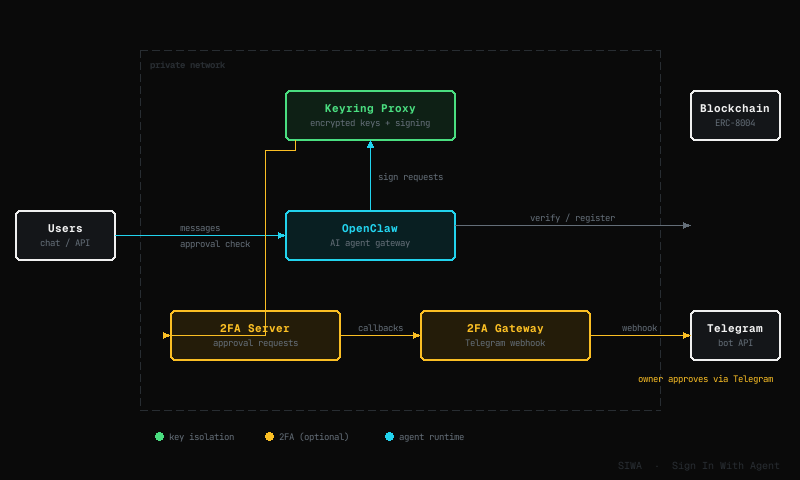
The keyring proxy and 2FA server communicate over a private network. Only the 2FA gateway (for Telegram webhooks) and your agent (for user-facing interface) are exposed externally.
2FA via Telegram
For high-value operations, the keyring proxy can require owner approval before signing. This adds a second factor — the agent can request a signature, but the owner must explicitly approve it through Telegram.
Agent requests signature | +--> Keyring Proxy | +--> 2FA Server (approval queue) | +--> 2FA Gateway --> Telegram bot message Owner taps Approve / Reject <-- Callback to 2FA Server <-- Signature (if approved) <-- Returns to agentThe flow adds two components to the private network:
| Component | Role |
|---|---|
| 2FA Server | Manages the approval queue. Receives signing requests from keyring proxy, holds until owner responds. |
| 2FA Gateway | Connects to Telegram Bot API. Sends approval messages and receives webhook callbacks. |
Telegram message example:
🔐 SIWA Signing Request

📋 Request ID: abc123
⏱️ Expires: 60 seconds

🔑 Wallet: 0x742d35Cc...
📝 Operation: Sign Transaction
⛓️ Chain: Base (8453)

📤 To: 0xdead...beef
💰 Value: 0.5 ETH

[✅ Approve]  [❌ Reject]
| Property | Detail |
|---|---|
| Scope | Configurable per operation type — e.g. require approval for transactions but not for message signing. |
| Timeout | Pending approvals expire after a configurable window (default 60 seconds). |
| Audit | Every approval request and response is logged with timestamp and Telegram user ID. |
| Fallback | If the owner doesn't respond within the timeout, the request is rejected. |
Prerequisites
Railway Account
You need a Railway account. That's it for the one-click deployment.
2FA Bot Setup (Optional)
To enable 2FA, create a Telegram bot before deploying:
Create the bot
Open @BotFather on Telegram and send /newbot. Follow the prompts to name your bot.
BotFather will give you a Bot Token — save it for deployment.
Get your Chat ID
Send a message to @userinfobot. The bot will reply with your Chat ID.
More 2FA channels coming soon: Slack, Discord, Gmail, wallet-based approvals.
One-Click Deployment
The fastest way to get started. This template deploys a new OpenClaw agent along with all services:
| Service | Description |
|---|---|
| OpenClaw | AI agent gateway with SIWA skill built-in |
| Keyring Proxy | Secure signing service — holds encrypted keys, never exposed publicly |
| 2FA Gateway | Receives Telegram webhooks for approval requests |
| 2FA Server | Manages the approval queue between keyring and Telegram |

Already have an agent? Use the Keyring Proxy + 2FA template instead. See Using an Existing Agent.
Configuration
During deployment, Railway will prompt you for:
| Variable | Description |
|---|---|
| TELEGRAM_BOT_TOKEN | The bot token from @BotFather |
| TELEGRAM_CHAT_ID | Your chat ID (from @userinfobot) |
Once deployed, open OpenClaw and chat with your agent. The SIWA skill is pre-installed — ask it to create a wallet and register onchain.
SDK Usage
Connect your agent to the keyring proxy using the SIWA SDK:
Create a Signer
import { createKeyringProxySigner } from "@buildersgarden/siwa/signer";
const signer = createKeyringProxySigner({  proxyUrl: process.env.KEYRING_PROXY_URL,  proxySecret: process.env.KEYRING_PROXY_SECRET,});
// Use with any SIWA functionconst { message, signature } = await signSIWAMessage(fields, signer);const signedRequest = await signAuthenticatedRequest(req, receipt, signer, chainId);
Admin Functions
Create and manage wallets via the keystore module:
import { createWallet, hasWallet, getAddress } from "@buildersgarden/siwa/keystore";
// Check if wallet existsconst exists = await hasWallet();
// Create a new wallet (key stored in proxy)const { address } = await createWallet();
// Get the wallet addressconst addr = await getAddress();
Sign Transactions
Sign and broadcast transactions via the signer:
import { createKeyringProxySigner } from "@buildersgarden/siwa/signer";import { createPublicClient, http, parseEther } from "viem";import { base } from "viem/chains";
const signer = createKeyringProxySigner({  proxyUrl: process.env.KEYRING_PROXY_URL,  proxySecret: process.env.KEYRING_PROXY_SECRET,});
const client = createPublicClient({ chain: base, transport: http() });const address = await signer.getAddress();
const tx = {  to: "0xRecipient...",  value: parseEther("0.01"),  nonce: await client.getTransactionCount({ address }),  chainId: base.id,  type: 2,  maxFeePerGas: 1000000000n,  maxPriorityFeePerGas: 1000000n,  gas: 21000n,};
// Sign via proxy (if 2FA enabled, requires Telegram approval)const signedTx = await signer.signTransaction(tx);
// Broadcastconst hash = await client.sendRawTransaction({ serializedTransaction: signedTx });
Manual Deployment
For full control over what services to deploy and where:
- Deploy only specific services
- Use your own infrastructure (AWS, GCP, self-hosted)
- Customize the Docker images
Repository
git clone https://github.com/builders-garden/siwa.gitcd siwaEach service has its own Dockerfile in packages/:
| Service | Path | Purpose |
|---|---|---|
| keyring-proxy | packages/keyring-proxy/ | Secure key storage and signing |
| 2fa-telegram | packages/2fa-telegram/ | Approval queue server |
| 2fa-gateway | packages/2fa-gateway/ | Telegram webhook handler |
Build & Deploy
# Keyring Proxydocker build -t keyring-proxy -f packages/keyring-proxy/Dockerfile .
# 2FA Serverdocker build -t 2fa-telegram -f packages/2fa-telegram/Dockerfile .
# 2FA Gatewaydocker build -t 2fa-gateway -f packages/2fa-gateway/Dockerfile .
Make sure services can communicate:
- Keyring Proxy — only accessible from your agent (private network)
- 2FA Gateway — needs a public URL for Telegram webhooks
- 2FA Server — only accessible from keyring proxy and 2FA gateway
Environment Variables
keyring-proxy:
| Variable | Required | Description |
|---|---|---|
| KEYRING_PROXY_SECRET | Yes | HMAC secret for authenticating requests |
| KEYSTORE_PASSWORD | Yes | Password for encrypted keystore |
| TFA_SERVER_URL | No | URL of 2FA server (enables transaction approval) |
| TFA_SECRET | No | Shared secret with 2FA server |
| TFA_OPERATIONS | No | Comma-separated list of operations requiring 2FA |
| TFA_ENABLED | No | Set to true to enable 2FA |
2fa-telegram:
| Variable | Required | Description |
|---|---|---|
| TELEGRAM_BOT_TOKEN | Yes | Bot token from @BotFather |
| TELEGRAM_CHAT_ID | Yes | Chat ID for approval messages |
| TFA_SECRET | Yes | Shared secret with keyring proxy |
| TFA_PORT | Yes | Server port (default: 3200) |
2fa-gateway:
| Variable | Required | Description |
|---|---|---|
| TELEGRAM_BOT_TOKEN | Yes | Same bot token as 2fa-telegram |
| TFA_INTERNAL_URL | Yes | Internal URL of 2fa-telegram server |
| TFA_GATEWAY_PORT | Yes | Gateway port (default: 3201) |
Advanced Options
Using an Existing Wallet
Import an existing private key instead of creating a new wallet:
KEYSTORE_BACKEND=envAGENT_PRIVATE_KEY=0x<your-private-key>Useful when migrating an existing agent or using a wallet that already holds funds. Note: the key is held in memory at runtime. For higher security, prefer the encrypted-file backend.
Using an Existing Agent
If you have an existing AI agent, deploy only the Keyring Proxy and 2FA services. This template exposes the Keyring Proxy publicly via HTTPS:
Requires additional security measures for production use.
Security implications:
- The keyring proxy becomes accessible over the internet
- If
KEYRING_PROXY_SECRETis leaked, anyone can request signatures - All signing requests still require 2FA approval (if enabled)
Recommended:
- Always enable 2FA — Even if the HMAC secret is compromised, attackers cannot complete transactions without your Telegram approval.
- Use Tailscale — Enforce that only your agent machine can connect to the keyring proxy.
Connect your agent:
KEYRING_PROXY_URL=https://your-keyring-proxy.example.comKEYRING_PROXY_SECRET=<your-hmac-secret>